Objectively, CI/CD and security testing services don’t go together. Yet, in 2026, velocity and scrutiny must find a way to collaborate. Because cyber attacks are the top risk for businesses. Have been for five years. GDPR is getting stricter. And the EU Cyber Resilience Act deadline is just a few months away, introducing mandatory public disclosure of vulnerabilities and fines of up to €15 million for non-compliance.
In this article, we’ll explore:
This is your guide to fast and resilient CI/CD
CI/CD pipeline security means combining tools, practices, and policies to protect the system through which your code travels. An important point in this definition is that you’re not only safeguarding your app. You’re also safeguarding the pipeline itself.
DevOps is insanely common. Around 80% of organizations rely on it. So, why would a hacker strain to chip away at your product if they can get a tiny bit of access to your CI/CD and pretty much take over everything? It builds, ships, and deploys your code. And the right attack on that system means devastating consequences.
So, the point of security testing in CI/CD pipeline is to protect the product and the system that creates it. Since a hacker can:
But even if we take unauthorized access out of the equation, the risks subpar CI/CD security testing introduces don’t decrease.
Over time, weak enforcement of quality and security checks can normalize risky shortcuts. If the pipeline allows releases to bypass testing or CI/CD vulnerability scanning, small exceptions become habits. Gradually, standards decline. And the organization begins shipping software that no longer meets its own security expectations.
Most teams know security software testing services as a separate procedure carried out closer to the end of the SDLC. It requires a specialized, dedicated QA team. And it’s comparatively slow if we’re talking about proper, in-depth checks. So, it’s seen as a hurdle more often than not.
But, over the years, companies learned the hard way that cyber resilience ignored is a business crippled. Still, teams can’t allow CI/CD security testing to slow them down. And instead of approaching security testing as one monumental task, it was divided into manageable and efficient “gates”.
This allows companies to use automated security testing in CI/CD as a gradual risk minimizer. You take care of the small issues first. Then, advance testing breadth in phases. And by the time you get to the finale and run pentesting, you’ve already eliminated a ton of vulnerabilities. So, the last part of your efforts, supposedly the most taxing one, doesn’t take that long.
Now, let’s take a close look at CI/CD security testing methods you’ll want in your pipeline.
SAST scans your source code before it ever runs. Because it’s performed early in development, it prevents vulnerabilities, like unsafe API usage or weak input validation, from being built into the app.
This technique scans your repositories and configuration files for hardcoded passwords, API keys, or private certificates that developers may have accidentally committed. It protects against credential leaks that could allow attackers to access your systems.
DAST tests a running app from the outside, mimicking how an attacker would probe it in a staging or test environment. By actively sending malicious inputs and analyzing responses, it uncovers runtime issues such as cross-site scripting (XSS) or injection flaws, helping prevent real-world exploitation of exposed endpoints.
Today’s apps don’t just use APIs. They are built on them. Mobile apps, web frontends, and microservices constantly exchange data through dozens of endpoints. That’s how they became some of hackers’ favourite targets. Continuous API security testing in CI/CD pipeline automatically checks things like authentication, authorization, input handling, and rate limits every time code changes.
These are lightweight security-focused tests written alongside unit tests. They validate that specific functions enforce security rules properly, such as rejecting invalid input or enforcing permissions. Such checks prevent logic-level vulnerabilities from slipping through by ensuring individual components behave securely by design.
SCA scans third-party libraries and open-source components used in your project. Since most modern apps rely heavily on external code, this protects against supply chain risks where attackers exploit outdated or compromised dependencies.
This broader scanning process inspects the pipeline itself, including build tools, scripts, plugins, and server configurations. It protects the integrity of your delivery process by preventing attackers from compromising the build environment to inject malicious code into releases.
This technique scans container images and orchestration files for vulnerabilities, outdated packages, and insecure configurations before deployment. It prevents insecure images from reaching production, reducing the risk of container breakout attacks or compromised runtime environments.
IaC scanning analyzes cloud configuration files and templates for misconfigurations like open storage buckets or overly permissive access controls. It protects cloud environments from exposure caused by configuration mistakes that could otherwise lead to data breaches.
This approach feeds logs and security findings into monitoring systems to detect suspicious activity in real time. It protects live environments by enabling rapid detection and response to attacks that bypass preventive controls.
Pentesting simulates real-world attacks against your live systems to uncover complex or chained vulnerabilities that automated tools may miss. It protects the organization by validating whether existing security controls truly work under realistic attack scenarios.
Threat modeling is a structured exercise where teams identify potential attackers, entry points, and high-value assets before building or changing systems. It protects critical components by ensuring security controls are placed where they matter most, rather than added reactively after incidents occur.
In these simulations, a “red team” attempts to breach systems while a “blue team” defends and responds. This tests not just technical defenses but also detection and incident response processes.
Combined, these methods of security testing in CI/CD workflows create a full-spectrum strategy: prevention, detection, and validation. But keep in mind that they form a strong baseline. Depending on your niche and project, you might need to enrich your security with other techniques, like compliance-specific checks or chaos and fault-injection testing.
Just remember that the perfect security testing CI/CD pipeline implementation is the one tailored to your case specifically.
Automating security testing in CI/CD pipelines doesn’t look like plugging in a bunch of automated checks at the very end. We’ve already established that CI/CD security is layered. So, let’s break down this “defense cake”.
Before code even leaves a developer’s laptop, run lightweight automated hooks locally. These checks scan for obvious but dangerous mistakes. The purpose is simple: stop sensitive data from ever entering the shared repository. Fixing a problem at this stage takes minutes instead of triggering a security incident later.
As soon as code is merged, automatically launch SAST and SCA scans. While the build artifact is being created, the automated security testing in CI/CD analyzes the code for insecure logic patterns and checks third-party dependencies. This ensures that both your custom code and the open-source components you rely on meet a minimum security baseline before anything moves forward.
Once the app is packaged, run a short, automated security smoke test in a containerized environment. This isn’t a full penetration test. It’s a fast, targeted check of core functionality to detect critical misconfigurations or glaring vulnerabilities. If something serious is exposed, the build fails immediately, giving the team fast, actionable feedback.
In a staging environment that mirrors production, execute deeper dynamic tests. DAST and API security testing with CI/CD integration simulate real-world attacks against the running system, looking for issues that only appear during execution — such as broken authorization, insecure data transfers, or business logic flaws.
Security shouldn’t stop at deployment. Run continuous monitoring in production, collecting logs, detecting anomalies, and alerting teams to suspicious activity or new misconfigurations. This stage acts as an early-warning system, helping you respond quickly if a new vulnerability emerges or an attacker attempts to exploit the live system.
There’s no reinventing the wheel here. Likely, you already have a lot of what you need to begin building CI/CD security testing. Still, turning this straightforward guide into an actual pipeline needs some work. Especially if you’re looking for a fast return on investment. QA outsourcing services are a good way to jump-start the process, create a system that delivers quickly, and gain expertise that will ensure lasting value.
Now, a few tips that will become the cherry on top of your defense cake. Our security and automated testing services experts have been helping clients for over a decade now. So, you can be sure that these insights are battle-tested.
Now, let’s chat about the backbone of fast CI/CD security testing.
CI/CD security testing tools are a huge contributor to a speedy pipeline. They work 24/7. They’re consistent. They process massive amounts of data. That’s why choosing your toolkit should be approached with extra care.
Now, we’ll review a few tool options — not to tell you what you should use but simply to show what you can expect in terms of features.
Be sure to choose tools based on what they can do for you. Don’t get distracted by fancy features that offer no real value.
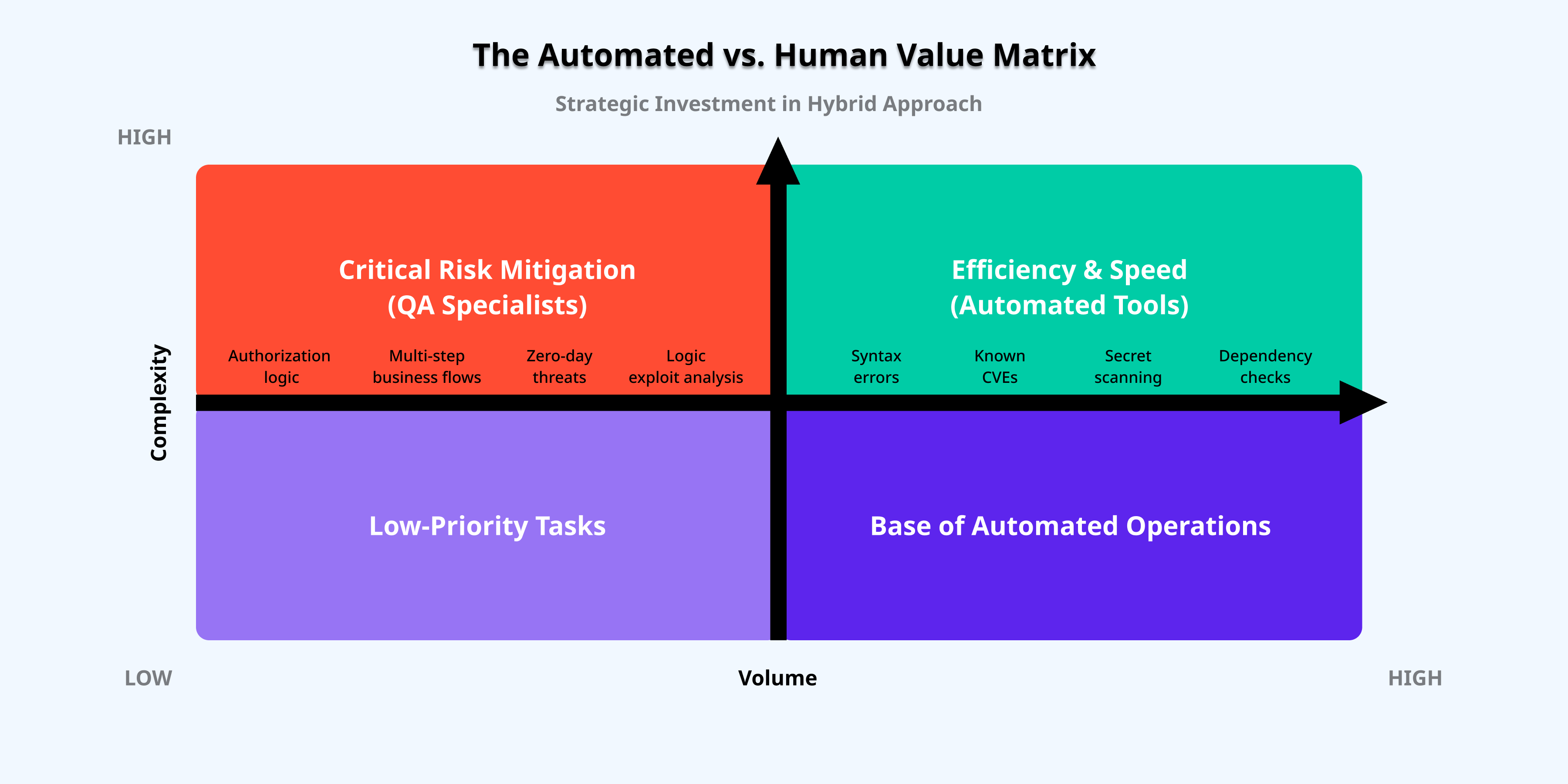
Chasing speed is now standard. And given the capabilities of CI/CD security testing tools, entrusting them with more looks like an excellent choice. But there’s a caveat. They’re powerful but mindless.
The point is, tools only follow the instructions they’re given. They don’t even peek outside the box. Plus, if those instructions are faulty, the tool will produce faulty results. So automated scans should always go alongside targeted manual checks.
For example, when our QA company started working with a client’s healthcare app, we agreed early on that manual testing was a must. So, while the automated pipeline handled standard vulnerability scanning, our QA specialists focused on the high-stakes logic: making sure that deep-link sharing and multi-user authorization protocols were bulletproof.
Combining manual and automated tests allowed us to find and fix over 1050 bugs and do so fast. Without automation, we’d still deliver a stable and secure product. But it would take ages. Without manual QA, testing would be speedy. But the quality would dwindle.
As we’ve mentioned earlier, in CI/CD security testing, the balance between velocity and scrutiny is everything.
It’s safe to say that the pressure to deliver fast will only increase. That’s why your CI/CD pipeline should be secure and resilient yesterday. The competitors won’t wait for you. They’ll move forward and leave you behind. Customers’ expectations won’t degrade. Their demands will only rise. And at some point, the distance between your “here” and “where you’re going” will be too great.
So, don’t wait. Start now, even if small.
And if you want to get to your dream destination faster — we’re here to help.
Our approach to CI/CD security testing focuses on:
Building fast and result-driven CI/CD doesn’t have to be difficult.
Automated GUI testing is a sort of controversial topic. It offers advanced speed, consistency, coverage,…
DevOps is becoming a universal practice. Yet, many teams don’t see the results they hoped…
Release days feeling like a high-stakes gamble isn’t rare. In Europe, the sheer variety of…
Treating mobile regression testing as a run-of-the-mill process is a risk. The pressure to deliver…
Software development is more mature than ever. And yet, we keep seeing the same old…
You’ve spent weeks coding, the engineering team has grown, and the pressure to ship is…