DevOps is becoming a universal practice. Yet, many teams don’t see the results they hoped for. In fact, the number of low-performing CI/CD automation testing initiatives is increasing. And the reasons for that don’t really change. So, in this article, we’ll break down:
Let’s begin.
CI/CD automates the code’s journey through the SDLC (building, testing, and deployment). Automation testing, on the other hand, is focused only on automating tests. You don’t click X, Y, Z to check whether the code works. A program does that for you. But that’s about it.
So, the tests are automated. The process around them isn’t. And just because you have automated regression testing, for example, doesn’t mean you’re ready for CI/CD.
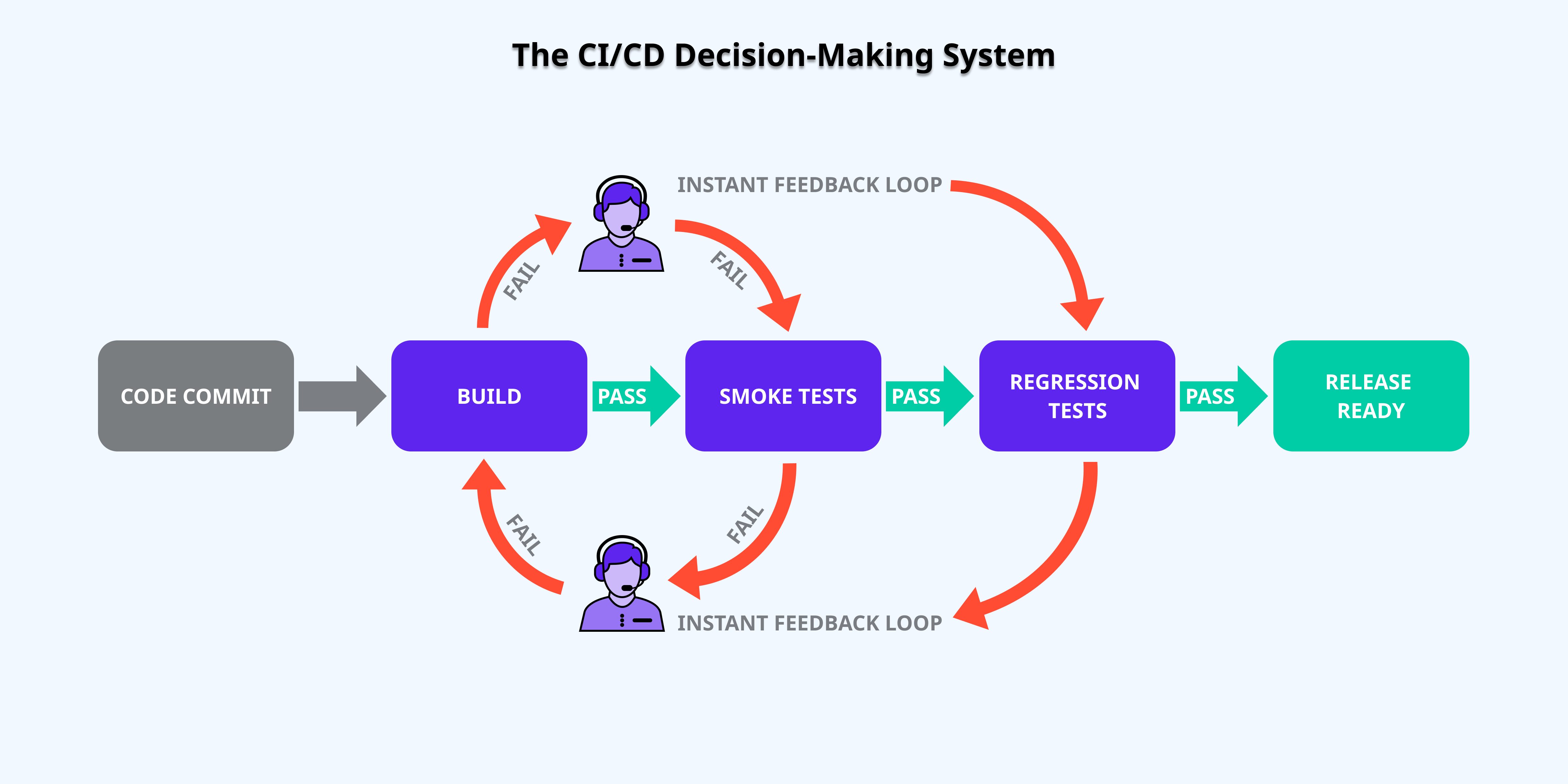
CI/СD isn’t just automation. It’s a decision-making system. Let’s walk through it.Imagine a team working on a mobile app. A developer makes a tiny change: adjusting a layout rule to fix a button overlap. Here’s what follows in CI/CD automated testing.
The developer saves the change and sends it to the shared codebase. The system is triggered. It knows to evaluate that change. No one decides whether to test it. No one chooses which tests to run. The process is automatic.
The CI/CD pipeline for automation testing takes the latest agreed version of the app. Adds the button fix. And puts them into a fresh, controlled environment. Automated tests on someone’s machine often rely on leftover settings, cached data, or manual tweaks. So, running them in a clean environment ensures results are reliable and repeatable.
The pipeline now tries to turn the code into a runnable app. If something is broken (missing files, misconfigured code), the pipeline stops immediately. In other words, further testing of that change isn’t warranted as it doesn’t function with the rest of the system.
CI/CD pipeline for automation testing sends a notification (email, Slack, dashboard, etc.) about what failed. The failure is tied specifically to this change, so the developer knows exactly where to start fixing. The issue is amended. And the cycle restarts.
The system runs the first layer of automated tests (unit, small integration, and basic sanity checks). They answer one narrow question: “Does this change obviously break the system?” (i.e., is it worth proceeding?) and catch the low-hanging issues immediately.
These fast tests shorten the feedback loop. If that feedback is quick:
Once the change passes, the system packages the app:
Essentially, this step says, “This change works. Now we can test it and the rest of the system as one”.
Next, broader automated testing in CI/CD pipelines is executed:
The goal is to make sure the change plays nicely with the whole system. If an issue is revealed, the current packaged artifact is blocked from moving forward. Developers are notified. A fix is applied to the source code. The automation testing in CI/CD pipeline restarts.
After the change passes all the previous steps, it’s considered release-ready. If you have continuous delivery, a person must manually click a button to approve the release. If you have continuous deployment, the change is automatically pushed directly to the production environment and the customers.
So, CI/CD in automation testing isn’t about having a lot of scripts. It’s about creating a strict guide for what happens to those scripts.
This means every team member follows the same set of rules for writing, reviewing, and merging their code. CI/CD with automated testing is essentially a robot that follows a specific script. If everyone works differently, the input becomes unpredictable. And the robot gets stuck.
Every single code change must be stored in a central system and tracked with a unique ID. The CI/CD pipeline needs a clear source of truth to know exactly which version of the code it should be building and testing at any given moment. Without this, you lose the ability to trace a failure back to a specific change, which makes debugging incredibly slow and turns every error into a guessing game.
The codebase should be organized into independent, modular pieces rather than one giant, tangled mess. “Spaghetti code” causes a small fix in one area to accidentally break a feature somewhere else. When your code is well-structured, CI/CD automation testing can check modifications accurately. It ensures that failures are isolated and easy to find, preventing the entire system from grinding to a halt over a minor update.
Tests must be 100% trustworthy. The pipeline relies on this feedback to decide if a change is safe to move forward. If your tests are flaky or incomplete, the team will stop trusting the system. Reliable testing is the only thing that gives you the confidence to move fast. Without it, you’re just using automation testing services to ship bugs to your customers.
Builds and tests must run in standardized, reproducible environments. Code can behave differently depending on the settings of the server it’s running on. By keeping these environments consistent, you ensure that a “pass” during testing actually means the code is safe for production, eliminating the frustration of bugs that only show up after the software has launched.
You wouldn’t try to build a skyscraper with just a hammer and nails. CI/CD tools for automation testing are the engine that handles the heavy lifting. Without robust infrastructure, the process will remain manual and brittle.
CI/CD in automation testing only works if the whole team takes shared responsibility for the health of the pipeline. Automation can only flag a problem. It can’t fix it. If a test fails and the developer responsible doesn’t jump in to fix it immediately, the entire “assembly line” stops for everyone.
To summarize it all simply, CI/CD requires mature software testing services.
Around 70% of transformation initiatives don’t meet their goals for mostly the same reasons. Lacking strategies, skill gaps, cultural resistance… These broader issues create precise “holes” in your automated testing CI/CD.
Teams often think that once they have CI/CD, bugs will go down. But it doesn’t improve quality. It checks whether it existed in the first place.
Let’s say a team has:
If they add CI/CD on top of this, every change will pass the pipeline. Because it doesn’t have anything concrete to go off of. Basically, there’s nothing for automation testing in CI/CD pipeline to operate with. As a result, the team thinks “CI/CD doesn’t work”. When in reality, it simply demonstrated that what came before it didn’t work.
A pipeline can’t be built before the entire process is fully understood. Teams look at what they think the process is: we build, we test, we deploy. And they automate that. But they miss a million small extra steps.
Let’s say QA always:
These aren’t part of the “official process”. When CI/CD automated testing is introduced, tests run without the tweaks, fail randomly, and produce untrustworthy results. Why? Because the pipeline wasn’t given clear instructions.
A common thought process for many is logical: if CI/CD is good, more of it must be better. So they try to add everything immediately:
All in one pipeline. And it backfires quickly.
A good CI/CD pipeline for automation testing is a series of gates:
Each gate has a clear purpose, runs only the checks relevant to that purpose, and either passes the change or stops it. The goal is not to prove perfection upfront. But to make small, confident decisions that allow a change to move forward.
So, when you have everything stuffed together, too many signals arrive at once. Teams can’t tell what failed, why it failed, or whether the issue belongs to the code or the test itself. Feedback becomes slower, failures become harder to interpret, and the system loses its ability to guide decisions.
From this point forward, everything spirals down.
A subpar pipeline will make the team lose trust in it. When automated checks fail for the wrong reasons — poorly written tests, unstable scripts, or checks that flag issues unrelated to real defects — they create noise.
Over time, developers learn that a “red build” often doesn’t mean anything serious. They stop reacting quickly, start ignoring alerts, or assume someone else will look into it. When a real, critical issue finally appears, it’s treated like just another false alarm and slips through. At that point, the pipeline still runs, but it no longer protects the product.
And so, the team swims in bug fixes, doesn’t actually benefit from automated testing in CI/CD, and is too busy firefighting issues instead of fixing the root cause.
When automated testing in CI/CD pipelines runs only in controlled, ideal conditions, it creates a false sense of security. On paper, everything may look healthy. In reality, users operate under far messier conditions: unstable networks, device switching, battery-saving modes, or regional connectivity issues.
When pipelines don’t reflect these real-world stresses, CI/CD “lies” about actual quality. The change passes all checks, not because it’s truly robust, but because it was never challenged in conditions that resemble actual use. The result is software that “passes CI/CD” yet fails customers.
Teams automate builds and tests, move faster through development… And then hit a hard stop before release. A large, manual regression phase becomes the final gate.
At that point, CI/CD no longer enables continuous flow. It simply accelerates the work up to a manual checkpoint. Releases queue up, pressure builds, and quality decisions happen late and under stress. The system is technically automated. But operationally constrained by human throughput.
Automated testing services only pay off if they remain stable and affordable to maintain. In poorly designed pipelines, small UI or workflow changes cause large portions of the test suite to break. Engineers then spend significant time repairing existing automation instead of delivering new functionality.
This usually happens when tests are fragile, tightly coupled to implementation details, or poorly prioritized. Without planning for maintainability (modular tests, regular script reviews and pruning, etc.), automated testing in CI/CD pipelines turns into a cost center rather than a safety net. The system starts to consume more resources than it saves. And leadership begins questioning its ROI. Thought it wasn’t the system that created a problem.
Alright. Let’s briefly recap what we have so far.
Now, allow us to highlight specific best practices that engineers at our QA company have gathered over 10 years of providing QA outsourcing services.
Focus automation on the 10–15 most critical user journeys that drive your business, instead of trying to test every minor button or visual tweak. Early on, coverage is less important than reliability. If core flows like “Add to Cart” or “User Registration” fail, you lose money instantly. Prioritizing automation on high-value paths ensures your pipeline protects revenue first.
Pick testing frameworks that align with your developers’ existing languages, e.g., Playwright for web (TypeScript/JavaScript) or Appium for mobile (Java/Kotlin). When QA and Dev “speak the same language”, the friction of reviewing and maintaining tests disappears. This prevents silos, keeps automated testing in CI/CD pipeline maintainable as the product grows, and ensures test code is trusted by the whole team.
Ensure your staging or test environment mirrors the real world, including network conditions, device fragmentation, and performance constraints relevant to your users. Many bugs are environment-specific. A build that passes in a perfect lab may fail for European users on low-connectivity devices. By simulating real conditions, a “green build” actually signals stability for your customers.
Make it a rule that a feature isn’t considered complete until its automated tests are written, reviewed, and pass in automation testing in CI/CD pipeline. This prevents testing debt. Shipping features without automation creates a growing backlog of manual work, which will eventually stall releases. Integrating tests into every ticket ensures the safety net grows alongside your innovation.
Treat test code like production code. Every new test must be reviewed by another specialist before entering the pipeline. Peer reviews catch flaky logic before it causes false alarms, maintaining trust in the pipeline. Developers can rely on automated feedback with confidence, which keeps CI/CD automation testing effective and actionable.
If you want a fast return on investment that doesn’t lose value, these five points are a must-have.
You’ll be using a handful of tools for CI/CD automation testing.
Selecting CI/CD tools for automation testing is comparatively easy. Making them actually deliver a profit is the hard part. So, consider these 3 issues that can destroy your tool’s value.
Some automated tests fail not because the app is broken, but because the test itself is unstable or poorly written. Every false alarm forces developers to stop what they’re doing and investigate. Not only does this waste time, but it also “trains” your team to ignore CI/CD automation testing pipeline.
Invest in stable, well-designed tests from the start.
Many teams assume CI/CD ends once code is deployed. But your automated tests can continue to run after deployment, acting as synthetic monitors. Even quick, simple checks every hour can catch critical failures — like a payment gateway or database outage — before real customers are affected.
Think of automation not just as a pre-release safety net but as a proactive monitoring tool. Continuous checks in production extend the value of CI/CD automated testing and protect your business around the clock.
Pipelines often rely on virtual simulators because they are cheaper and faster than real devices. But simulators can’t accurately reflect real-world hardware quirks. For example, mid-range or budget devices may handle memory, battery, and background processes differently. Testing only on simulators leaves a large portion of your user base untested, effectively guessing that your app works for everyone.
Use a hybrid approach. Combine simulators for speed with real devices in a cloud or device farm. This ensures that CI/CD automation testing reflects actual market conditions.
You can have the most sophisticated CI/CD tools in the world. But if your team is still divided into “manual” and “automation” silos, your pipeline will stall.
In a traditional setup, a manual QA engineer finds a bug and documents it. Then, they hand it over to an automation engineer, who then tries to script it days later. This knowledge gap is exactly where the manual bottleneck and the trust deficit come from. By the time the script is written:
As we’ve learned through our automated testing services for CI/CD, the best way to sustain a high-velocity pipeline is through general specialists. These engineers are proficient at both manual and automated testing. Why are the generalists better?
If you want a versatile, dedicated QA team that turns release day into just another Tuesday, we’re here to help.
To extract real value from CI/CD automation testing, you need to be strategic. Because every decision you make will impact the quality of the pipeline. Luckily, we already have a battle-tested approach that refines your CI/CD and delivers fast results.
Our technique for CI/CD automated testing ensures:
And it’ll help you build not just a fast pipeline, but also one that delivers unmatched quality.
Automated GUI testing is a sort of controversial topic. It offers advanced speed, consistency, coverage,…
Objectively, CI/CD and security testing services don’t go together. Yet, in 2026, velocity and scrutiny…
Release days feeling like a high-stakes gamble isn’t rare. In Europe, the sheer variety of…
Treating mobile regression testing as a run-of-the-mill process is a risk. The pressure to deliver…
Software development is more mature than ever. And yet, we keep seeing the same old…
You’ve spent weeks coding, the engineering team has grown, and the pressure to ship is…