
 Anastasiia Letychivska
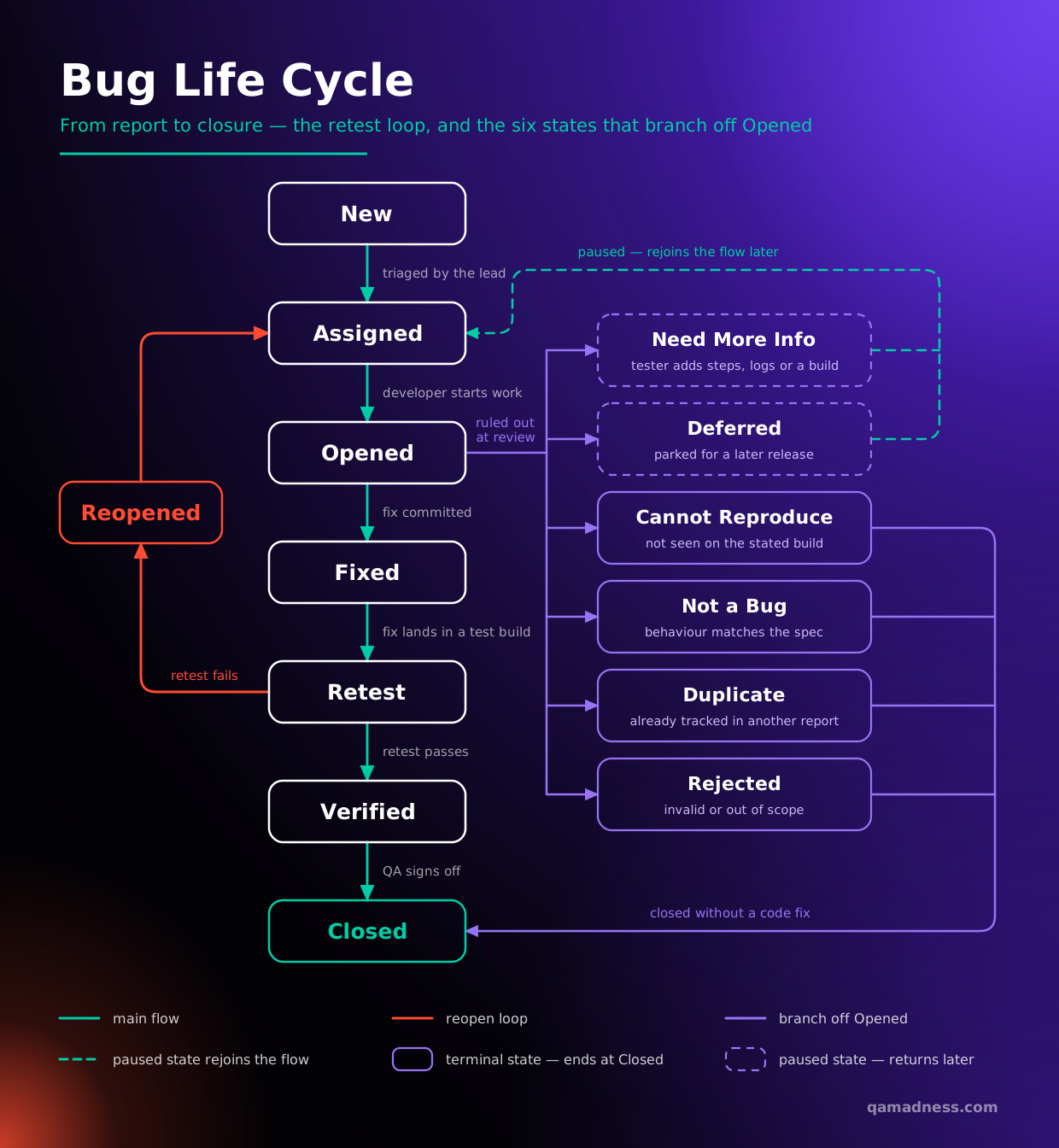
 A bug life cycle in software testing is a set of statuses designed to coordinate defect management. A bug status helps keep all the members of the development team – from project managers to developers – posted on the progress. The cycle starts when a QA engineer reports a new issue in the tested software and ends when the issue is closed.
In 2026, the bug life cycle has shifted toward intelligent triage. As development cycles accelerate with CI/CD pipelines, a professional software testing company now uses AI-driven tools to automatically categorize and prioritize defects, ensuring that human QA resources focus on complex logic rather than repetitive syntax errors.
What Are the Essential Stages of the Defect Life Cycle?
A defect life cycle can consist of different stages depending on a company’s practices. Available defect management tools, the number of team members, and adopted methodologies (like Agile or DevOps) impact the workflow.
Below, you will find information about the frequently used statuses that designate different stages of the defect management process. Some of them are mandatory and some are optional, used to provide more details about the progress.
1. New
Let’s say a software tester starts inspecting a product and finds a bug. What’s next? A specialist logs the defect into a tracking system, describing the steps for reproducing, environment details (OS, device, browser), and severity. The defect is assigned the New status.
2. Assigned
A project manager, team lead, or developer in charge reviews the report. They check whether the bug is valid. If yes, they choose a developer to fix the defect. The choice might depend on the type of the bug (e.g., front-end or back-end, coded in PHP or Python, etc.) and available resources (who has enough time and expertise to solve the problem). The bug goes to the Assigned status.
3. Opened
A developer who is to fix the issue sets the Opened status and starts analyzing the problem. A closer look at the defect may reveal some pitfalls. Thus, instead of fixing the bug, a developer has to change the status.
If the problem is reproducible and obvious, the developer starts working on fixing it.
4. Fixed
As soon as the developer makes changes to the code, the bug goes to Fixed.
5. Retest
The task returns to the QA specialist, who checks if the problem is actually solved.
6. Reopened
If a software tester discovers that it is still possible to reproduce the bug, they Reopen it. A developer looks into the problems once more. The task goes from Fixed to Retest to Reopened until the defect no longer exists.
7. Verified
If a QA specialist confirms that the bug has been fixed, the status changes to Verified.
8. Closed
Closed is a status that marks the final stage of the bug life cycle. The work is done.
What Other Statuses Can a Bug Get?
Not every defect travels the full path to Closed. 6 statuses end or pause the cycle early, and a team that does not agree on what they mean ends up with a backlog nobody trusts.
| Status | What it means | Who decides | Risk if misused |
|---|---|---|---|
| Duplicate | The identical problem was already reported | QA lead or triage | Closing the wrong one loses the better reproduction steps |
| Rejected | The bug is not reproducible | Developer, confirmed by QA | Becomes a dumping ground for anything hard to reproduce |
| Not a bug | The behaviour is intended | Product owner, not the developer | Used to close valid usability complaints |
| Deferred | Real, but not now | Product owner | The most abused status. Deferred bugs accumulate silently |
| Cannot be fixed | A platform or third-party limitation | Development lead | Needs a documented reason, or it is indistinguishable from “we gave up” |
| Need more info | The report is incomplete | Developer, back to the reporter | Stalls indefinitely if nobody owns the follow-up |
Watch Deferred most closely. It is the only status that leaves a confirmed defect open with no owner and no date. A backlog of deferred bugs with no review cadence is the commonest finding in a defect management audit
Who Participates in the Bug Management Process?
There are two main participants in the bug life cycle — a software tester and a developer. One finds and logs the bug, and the other fixes it. In bigger teams, however, other specialists get involved in the defect management process.
When it comes to defining bug severity and priority, also known as bug triage, someone has to evaluate and prioritize the defects. The person in charge of prioritization discusses the particularities of defects with other team members. All the people involved in this process are known as the defect triage committee. The process can go like this:
- A Test Lead or QA Engineer determines bug severity.
- A Development Team Lead assesses the potential risks.
- A Project Manager decides on bug priority and discusses the deadlines for fixing.
- A Development Team Lead assigns the task to a developer and sets deadlines.
Again, the exact workflow depends on the team structure and processes. In big companies, Department Heads and CTO can be involved in the discussion, too.
- QA Lead: Determines bug severity based on technical impact.
- Development Lead: Assesses potential risks to the codebase.
- Project Manager: Decides on bug priority based on business goals.
Whether you rely on internal staff or software testing outsourcing, clear roles ensure that blocker bugs are fixed before they reach production. According to the Google Cloud DORA Report, high-performing teams that integrate quality gates early in their pipeline see significantly lower change failure rates.
Where those roles do not all exist in-house, a dedicated QA team covers the QA side of the cycle — triage, retesting and verification — inside your existing tracker.
A Real-World Example of a Bug Life Cycle
New. A QA engineer (let’s call him Bob) goes to the website of an online bookstore he is testing and adds a book to a cart. The item appears in the cart, but Bob can’t order two of the same books. A click on “+” to change the number of items doesn’t actually change it. Bob describes the problem and logs a bug as New.
Assigned. A PM (let’s suppose this is Susie, and she’s in charge of delegating the tasks) sees a bug on the list. The problem appears to be valid and serious. Susie assigns the task to a back-end developer, Alex, who coded the cart functionality.
Opened. Alex sees a new task and tries to reproduce it following the instructions in the report. Indeed, the “+” doesn’t work as intended. Alex changes the bug status to Open and starts looking for the root cause.
Sometimes, however, things don’t go this way. Alex knows that the bug can be invalid. In this case, instead of marking the defect as Open and trying to fix it straight away, he can use a different status, for example:
- Duplicate. When studying the report, Alex realizes that Sam, another software tester, logged this bug yesterday. Alex marks the bug as Duplicate. There is no need to add it to the pool of tasks once more — it is already there.
- Rejected. Using the instructions from the bug report, Alex adds the book to the cart and clicks on “+.” The number of items changes to two. How’s that possible? Maybe an unstable internet connection caused the problem. Or maybe the defect appears on a specific device, but Bob forgot to include this information in the description.
- Deferred. The bug occurs only on the Firefox browser, which has a small share among users. Alex decides to fix it later, after figuring out a more critical problem: why the payments fail.
- Not a bug. Alex is concerned at first, but then he realizes that Bob tried to buy an extra ebook. It’s impossible because of the website logic: a user can access an ebook from any device, and there’s no need to buy it twice.
- Need more info. Alex does not understand under what circumstances the bug appears. Is a user logged in or not? Is Bob trying to add an item on a product page or at the stage of order confirmation?
- Cannot be fixed. Alex is aware of this problem and has tried to solve it more than once. It is a hard-to-find bug, and he needs to review a huge codebase to fix it. At the moment, a user can order two books by typing the number “2” into the box displaying the number of items. It’ll do for now.
Fixed. Alex finds a mistake in the code and fixes it. The status goes to Fixed.
Retest. Bob receives a notification about the status change. He needs to check the functionality once more and make sure users can change the number of books now. He sets the Retest status and starts working.
Reopened. Unfortunately, during the retesting, Bob discovers that the bug still occurs. A click on “+” does not change the number of items. The task goes back to Alex under Reopened status. Alex needs to look into the problem once more. The bug will go through the Fixed and Retest stages again. It is an alternative outcome of the retest rather than the next step.
Verified. During testing, Bob ensures the button works as expected. Now, a user can change the number of items in the cart using “+”. Bob changes the defect status to Verified.
Retest and verification are hands-on work. Reproduce the original steps, verify that the fix didn’t break anything adjacent, and confirm that the environment matches. That is the manual testing part of the cycle, and the part that releases pressure squeezes first.
Closed. Susie sees that the problem is solved and closes the task.
In 2026, this process often happens in a “Shift-Left” environment. If Alex were using automation testing services, a pre-commit check might have flagged the cart error before Bob even saw the build, saving the team hours of manual triage.
Real processes are less tidy than the example above. On an investment platform, our engineer joined a live product with minimal documentation and logged every defect found while learning the system. The team then fixed them by business priority, across 10 operating systems and browser combinations.
How to Manage Defect Fixing in Modern Pipelines?
To manage fixes effectively, you need a proven test automation strategy. For repetitive UI issues, automating regression testing is a lifesaver. It ensures that when you fix a “High Priority” bug, you don’t accidentally break something else.
By partnering with a quality assurance & testing company, you gain access to senior SDETs who can implement “Self-Healing” tests. These AI-powered scripts automatically adjust the bug life cycle when they detect minor UI changes that aren’t actual defects.
Defect Metrics to Track in 2026
4 metrics tell you whether your defect process works. Each one points at a process problem rather than at code quality, which is why they belong in a QA review rather than a developer scorecard.
➛ Defect leakage. Defects found in production ÷ total defects found, for the same release. It measures what your testing missed. Rising leakage points at coverage gaps or a shrinking regression window, not careless developers.
➛ Reopen rate. Bugs moved from Verified or Closed back to Reopened ÷ total bugs closed. A high rate points at 1 of 3 things. Incomplete fixes, unclear reproduction steps, or a test environment that does not match production. It is the fastest signal that the Fixed → Retest handoff is broken.
➛ Mean time to resolution (MTTR). Average time from New to Closed, split by severity. Averaged across all severities it tells you nothing: a cosmetic bug open for 3 months hides a critical one fixed in an hour.
➛ Defect density. Defects ÷ size of the component, usually per thousand lines of code or per module. Useful for comparing modules against each other, and misleading when compared between teams or products.
How to read them together. Leakage and reopen rate are the pair that matters. High leakage, low reopen rate: you are not finding enough. Low leakage, high reopen rate: you find them but do not fix them properly. Both are process problems, with different owners.
Reviewing where those numbers come from, and whether the statuses behind them mean the same thing to everyone, is what our QA audit and consulting services cover.
Bug Tracking Tools Compared: Jira vs. Alternatives
The tool matters less than the workflow you configure in it, but 5 options cover most teams. The deciding factors are usually whether you need genuine custom statuses and where your team already works.
| Tool | Custom workflow statuses | TestRail integration | CI/CD | Reporting | Price | Best for |
|---|---|---|---|---|---|---|
| Jira | Full. Statuses and transitions, with built-in workflows copyable rather than editable | Yes. 2-way sync for defects and requirements | Jenkins, Bitbucket, GitLab, GitHub, Bamboo | Over a dozen built-in agile reports, configurable dashboards | Free up to 10 users. Paid pricing is JS-rendered and could not be read; Atlassian’s licensing page gives a monthly Standard example of $8.60 per user at 1–100 seats | Teams needing a configurable workflow and broad integrations |
| Azure DevOps | Yes, on inherited processes. Add, edit and remove states | Yes, via a TestRail Marketplace app | Azure Pipelines, with 1 free hosted job and 1,800 minutes a month | Kanban boards, backlogs, team dashboards, custom reporting | First 5 users free, then $6 per user per month | Microsoft-stack teams wanting tracking and pipelines in one place |
| YouTrack | Not verified. JetBrains’ help pages would not render | Yes, listed on TestRail’s integrations page | Not verified | Not verified | Free for teams up to 10. Paid pricing is from a June 2025 JetBrains post, starting at $4.50 per user per month annually | JetBrains-stack teams. Verify current pricing directly |
| Linear | Yes, team-specific, within fixed categories. No free-form transition graph | Not listed on TestRail’s integrations page | Not verified | Insights, Dashboards and Pulse are paid features | Free: 2 teams, 250 issues. Basic $10, Business $16 per user per month billed yearly | Product teams wanting speed over configurability |
| GitHub Issues | No workflow engine. Issues are open or closed. Finer states come from Projects single-select fields | Yes. TestRail integrates with GitHub Actions and Issues | GitHub Actions, 2,000 free minutes a month, free for public repos | Projects tables, boards and roadmaps with custom fields | Free forever, unlimited public and private repos. Team $4 per user per month for the first 12 months | Teams already living in GitHub who do not need a state machine |
3 things the table should change about how you choose.
GitHub Issues is not a like-for-like alternative. Its documentation describes metadata — “issue types, labels and milestones” — plus Projects single-select fields holding “up to 50 options”. A Status field is a value, not a state with transitions. You cannot stop a bug moving directly from New to Closed, which disqualifies it for a team that wants an enforced workflow.
TestRail’s integrations page lists the other 4 but not Linear. If your test management lives in TestRail, check that before committing.
2 of the 5 publish no readable prices. Atlassian’s and JetBrains’ pricing pages are rendered in JavaScript. The figures above come from Atlassian’s licensing documentation and a JetBrains blog post from June 2025. Treat both as indicative and get a current quote.
For a broader look at the market, see our guide to choosing bug tracking software.
When to Bring in a QA Team for Defect Management
A bug tracker is easy to install and easy to misuse. Bring in an external QA team when 1 of 4 symptoms appears.
➛ Defects keep returning from Fixed. A high reopen rate puts the problem in the handoff, not the code. Usually unclear reproduction steps, or a test environment that does not match production.
➛ Bugs reach production that testing should have caught. Rising defect leakage points at coverage gaps or a regression window that keeps getting compressed.
➛ The backlog fills with unclosed defects. Usually a Deferred pile with no review cadence. Every one of them was confirmed by somebody.
➛ There is no agreed way to prioritise. When severity and priority blur together, the loudest stakeholder sets the order instead of business impact.
Our QA audit and consulting services review the process itself: how statuses are used, who owns each transition, and which metrics would show the problem sooner next time.
To Sum Up
A bug life cycle ends with defect resolution, but it opens the next stage of the release cycle: automating regression testing. After everything is fixed, specialists check the business-critical features to ensure that the fixing hasn’t broken what was working well.
Bugs keep reopening or slipping into production? Let’s audit your defect management process.
We look at how your statuses are used, where defects stall, and what your reopen rate and leakage really are.
FAQs
What is the main difference between bug severity and priority?
Severity is a technical assessment of how “broken” the system is. Priority is a business decision regarding “how fast” it needs to be fixed. You can read more in the ISTQB Glossary on defect standards.
Can we use QA outsourcing for bug management only?
Yes. A dedicated QA team can own the QA half of the cycle — discovery, triage, retesting, and verification — while your developers keep the fixing. That split works because the engineer who reports a bug should not also sign off on the fix.
Does the bug life cycle change for mobile QA?
The stages are the same, but the “Environment” details are more complex. Mobile app testing bug reports must include specific device models, OS versions, and network conditions (e.g., 5G vs. Wi-Fi).
Why should I hire a software testing company for defect tracking?
A specialized software QA services provider brings a structured workflow and high-end bug-tracking tools (like Jira or TestRail) that prevent critical defects from being “lost” in the backlog.
What defect metrics should a QA team track?
4 metrics cover most needs. Defect leakage, reopen rate, mean time to resolution, broken down by severity, and defect density. Read leakage and reopen rate together. High leakage with a low reopen rate means you are not finding enough. Low leakage with a high reopen rate means fixes are not holding. Both point at process problems rather than code quality.
Which bug tracking tool is best for a growing team?
It depends on whether you need enforced workflow statuses. Jira and Azure DevOps both support custom statuses and transitions, and Azure DevOps is free for the first 5 users. Linear is faster to use but constrains statuses to fixed categories. GitHub Issues has no workflow engine at all: issues are open or closed, with finer states coming from the Projects fields. Check TestRail integration before deciding, since Linear is not listed on TestRail’s integrations page.
What does a QA audit check in the defect management process?
An audit checks 4 things. Whether statuses mean the same thing to everyone. Who owns each transition? How long do bugs sit in Deferred without review? And whether anyone measures the reopening rate and defect leakage. It usually covers the bug report template too, since most reopened defects trace back to incomplete reproduction steps rather than bad fixes.