
Originally Published: Oct 29, 2021 | Last Updated: March 11, 2026
It is easy for a newbie to get mixed up with QA terminology. What is a test scenario? What is the difference between test scenarios, test cases, and test scripts? In the fast-paced world of 2026, where digital products must survive complex biospheres and hyper-fragmented devices, understanding these terms is crucial for any business owner.
What is the Definition of a Test Scenario in 2026?
To make things clear, we need to start by defining the term “scenario”. In software development, a scenario is a user journey while using an application or website. A tester’s job is to find out how people interact with the functionality and what problems they can face.
A test scenario is a set of manual or automated test cases that helps determine the positive and negative project characteristics. It provides an overview of what needs to be tested by a QA company. The main purpose is to check the entire system performance from the end-user point of view — essentially putting yourself in the user’s shoes. This gives QA resources a clear idea of the actual scenarios the software will cope with after release.
Pros and Cons of Using Test Scenarios
Test scenarios are a practical tool for most QA workflows, but like any technique, they come with trade-offs worth knowing before you rely on them.
What works well:
- Faster planning – you focus on user goals, not granular steps, so the team moves quicker
- Accessible to everyone – developers, product managers, and clients can all read and understand them
- Wide early coverage – they map out key user flows before detailed test cases are even written
- Adaptable – easy to update as requirements shift without rewriting entire test suites
- Great starting point – a natural first step before breaking work down into detailed test cases
Where they fall short:
- Edge cases slip through – without step-by-step detail, subtle bugs are easier to miss
- Inconsistent execution – different testers may interpret the same scenario differently
- Limited for complex features – highly technical or multi-condition functionality needs more precision
What is the Difference Between a Test Scenario, Test Case, and Test Script?
Before moving on, it’s important to understand how these documents differ. According to standard practices at a quality assurance & testing company, they are categorized as follows:
- Test Scenario: Any functionality that a software testing company can examine. It is also called a “Test Condition” or “Test Possibility”.
- Test Case: A document that lists the specific steps a QA engineer needs to execute.
- Test Script: A short program written in a programming language used to test part of the functionality automatically.
Find more details about the differences in the table below.
Test Scenario vs Test Case vs Test Script
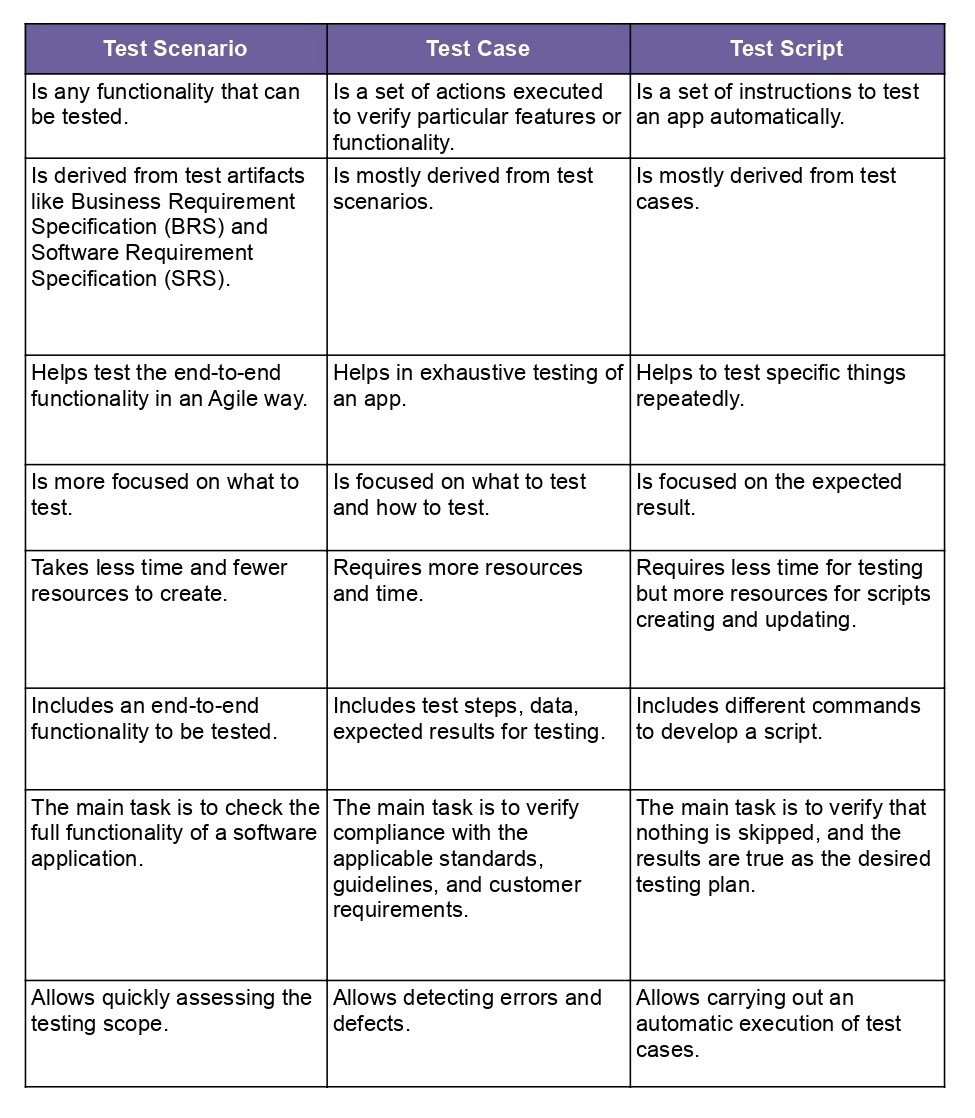
Sometimes you need more than one type of documentation. It depends on the project. Each type complements the other and makes the testing process more productive.
When Should You Use Each Type of Testing Documentation?
Each type complements the other to make the automation testing process more productive.
- For tasks performed repeatedly, like automating regression testing, use test scripts.
- For certain specific functions or testing new ideas, use test cases.
- For imitating user behavior and assessing the scale of the work, use test scenarios.
Many firms choose to QA outsource these tasks to access professional software testing services without the overhead of internal hiring. According to Statista, the global demand for test automation services continues to grow as companies shift toward continuous delivery.
Why are Test Scenarios Important for Your Software Project?
A test scenario is a general view of what needs to be tested. It helps:
- Assess the actual situation on the project.
- See the full scale of work and prioritize it correctly.
- Provide sufficient test coverage so users don’t face serious problems after release.
A software testing company uses scenarios to ensure all key functionalities are tested, which is especially important for large applications intended to scale. It also saves time because a one-line description is often sufficient compared to detailed test cases.
Peculiarities of a Test Scenario Usage
A test scenario has several advantages for the software testing process:
- It ensures that all the key functionalities will be tested. It is especially important for large applications or those intended to scale in the future.
- It saves time. A test scenario doesn’t require such a detailed description as a test case does: one-line description is sufficient.
- It reduces the probability of errors. Test scenarios are usually written after brainstorming, so the chance of missing any behavior is minimal.
In some cases, test scenario usage is an ideal decision, while sometimes you can do testing without them. Let’s look at both options.
When to use test scenarios:
- If you need to check the full functionality of the application;
- If you need to quickly determine the scope of testing work and prioritize it correctly;
- If you need to think about users’ behavior.
When not to use test scenarios: If you don’t have much time, or the site/application is unstable.
How Can You Create a Test Scenario Step-by-Step?
Creating a scenario comes with practice and a deep understanding of the product. A QA company typically follows these steps:
- Data Collection: Examine documentation like Business Requirement Specifications (BRS) and Functional Requirement Specifications (FRS).
- Defining Scenarios: List all positive and negative scenarios covering at least the business-critical features.
- Creating a Traceability Matrix: Ensure each requirement is covered by a scenario.
- Approval: Get scenarios reviewed by a team leader or project manager.
Whether you are performing manual software testing or mobile app testing, following these steps ensures no user behavior is missed during brainstorming.
What are the Best Practices for Writing Test Scenarios in 2026?
- One Scenario per Requirement: Each requirement should be checked separately to ensure accuracy.
- Prioritize: If the number of scenarios is too high, prioritize based on client preferences and risk.
- Keep it Simple: Scenarios must be easy to understand, accurate, and traceable.
In 2026, many C-level leaders prefer QA outsourcing to leverage a dedicated QA team that specializes in outsourced software testing. This allows internal teams to focus on core innovation while experts handle the heavy lifting of mobile QA and outsourced testing.
Test Scenario Examples
Let’s imagine we need to test a new delivery app. There are several test scenarios with the corresponding test cases you can apply. Find the examples below.
Test Scenario 1. Check the Login functionality.
- Test Case 1: Enter Mail ID.
- Test Case 2: Enter User Name.
- Test Case 3: Enter Password.
- Test Case 4: Enter Wrong Password.
- Test Case 5: Enter Correct Password.
Test Scenario 2. Check the Search Functionality.
- Test Case 1: Check search results with valid input.
- Test Case 2: Check the search sustainability to SQL injections.
- Test Case 3: Check input for invalid values.
Test Scenario 3. Check the Cart Functionality.
- Test Case 1: Verify that the user can add to the cart one or more products.
- Test Case 2: Verify that the user can change the amount of product in the cart successfully.
- Test Case 3: Verify the limit to the number of products a user can buy.
- Test Case 4: Verify that the user can delete one or more products from the cart.
Often, it is enough to list only the test scenarios to assess the scale of the work:
- Test Scenario 1. Check the Login functionality.
- Test Scenario 2. Check the Search Functionality.
- Test Scenario 3. Check the Cart Functionality.
When you have a list of test scenarios, it is clear how much work awaits the team, and you can start prioritizing tasks.
When to Use Test Scenarios, Cases, and Scripts? You may use some test cases from scenarios in other (new) projects. You may also use the ready-made parts of a test case from one scenario in a completely different test case as well.
To Sum Up
With every new functionality, the number of test scenarios increases. The main task of a software tester is to learn how to use them effectively. To do this, you need to mimic real users’ behavior and correctly prioritize the features of the tested software.
FAQ
When should I avoid using test scenarios?
If you have very little time or the application is extremely unstable, it might be better to focus on immediate fixes first.
Can I use the same test scenarios for different projects?
Yes, you can reuse ready-made parts of test cases and scenarios in different projects to save time.
How do test scenarios improve SEO?
By ensuring the entire system performs well and remains bug-free, you lower bounce rates and improve the user experience, which is a key ranking factor in 2026 AI-driven search.
What is the role of a software testing company in this process?
A specialized quality assurance & testing company provides the QA services and test automation strategy needed to transform scenarios into high-performing automated testing services.