Automated GUI testing is a sort of controversial topic. It offers advanced speed, consistency, coverage, and reduced testing efforts. But it can also bring maintenance messes, flakiness that leads to firefighting and burnout, and disappointing ROI. Let’s explore this from a practical standpoint:
In this article, we want to show you that automation and a graphical user interface are actually a good combo. The key is getting it right.
GUI is the visual layer of your app — the part users see and engage with:
And GUI testing is the process of interacting with all those elements to see if they behave correctly. Your team clicks, scrolls, resizes windows, switches tabs — does everything a customer would. These actions are simple and repetitive. So, logically, GUI automated testing sounds like a good idea.
The trouble is, a GUI is both functional and non-functional. Let us elaborate.
Proper GUI testing needs to answer “does this work?” and “how does it work?” If you take a look at unit tests, for example, they’re perfect candidates for automated testing services because they only answer “yes” and “no” (does this code work?). If you take a look at usability testing, which essentially evaluates UX, it focuses solely on the “hows” of your app (user satisfaction, experience, confusion, etc.).
GUI can be both.
This is everything your customer sees — buttons, icons, text fields, color schemes, and overall layout. GUI testing checks whether these elements exist. But it also evaluates whether they are positioned correctly, readable, consistent, and aligned with your brand guidelines.
GUI test automation can’t tell whether the layout looks and feels right.
Here, we focus on how the app responds to user actions — clicks, swipes, typing, dragging, or tapping. It’s not enough that the button triggers a function. The app must interact with the user smoothly, intuitively, and predictably.
Automated GUI testing tools can’t fully assess such aspects.
Users access apps on many devices and screen sizes. GUI testing verifies that the layout adapts gracefully — whether on a tiny smartphone, a tablet, or a large 4K monitor. GUI automation testing can check element visibility and positioning, layout consistency, and basic interactions.
But it can’t review visual appeal and readability, UX subtleties (e.g., feeling that a menu is cramped), or complex dynamic elements, like animated components.
This maps out how users move through your app. GUI testing ensures navigation flows are clear, consistent, and reliable: clicking “Home” always returns home, menus behave as expected, and users never get trapped on a dead-end page.
Yet, GUI automation testing can’t comprehend intuitiveness or the cognitive load your app has on customers.
So, our first “con” is the gap between functionality and usability. This means that you need to be really strategic and know where to apply automated testing. On the other hand, this might make you wonder:
If automated testing for GUI can’t do this and that and something else, why bother?
Manual GUI testing may feel familiar and more fitting. But it comes with limitations that directly affect your team, release cycles, and users.
Simply put, manual GUI testing that’s taxing will only cause more problems. It’s great for exploration, checking UX, and testing brand-new features. But when your team spends days on repetitive tasks, they might not have enough time for that.
Automated GUI testing has enough of its own issues.
Automated GUI tests are fragile. Small UI changes, timing issues, or browser differences can cause false failures. Tests might fail for reasons unrelated to actual bugs, leading to wasted debugging effort. As a result, teams may lose trust in automation and start ignoring alerts. At some point, actual issues can slip through.
GUI automation testing is slower than API or unit tests because it interacts with the UI, often waiting for elements to load. Running full GUI suites on every commit can slow down CI/CD pipelines.
Apps with constantly shifting layouts, A/B testing, or rapidly evolving features are difficult to maintain in automation. Scripts might need rewriting every time there’s a UI change.
Setting up automation for the GUI requires:
For complex apps, this can take weeks or months of upfront investment. And if you don’t do it right, all of your effort can go to waste.
So, we have limits at both ends of the spectrum. Does this mean you have to settle for what you deem to be the lesser of the two evils? No. You need both manual and automated GUI testing. Because, interestingly, they cancel out each other’s downsides.
When you strategically apply manual and automation testing services to GUI, you gain the perks of both methods while keeping their “quirks” to a minimum.
So, the key to fast and quality-driven testing is the balance between manual and automated QA. Hands-on checks handle complex tasks that require human judgment or need extra care. And automation takes care of the repetitive heavy-lifting, like regression, cross-browser, or smoke testing.
Now, let’s review how this balance should look.
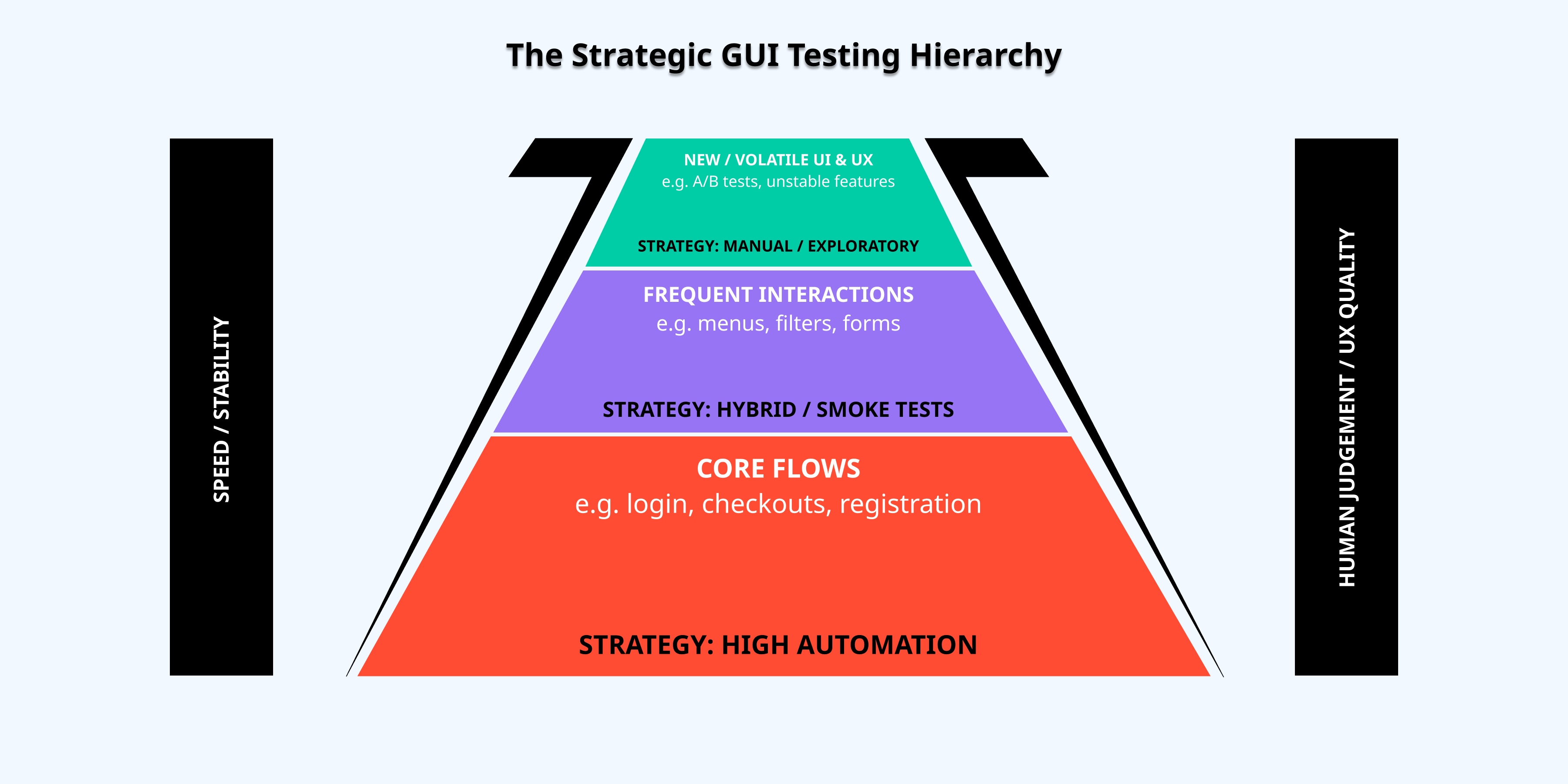
Before writing a single test, know why you are trying to achieve. Not every scenario warrants GUI test automation. And if you start automating everything, you can end up with tests that offer little to no value yet require a ton of maintenance.
Start with protecting business-critical features and repetitive, high-risk flows. For example, focus on stable user journeys like login or checkout. And avoid automating volatile or experimental UI elements that change often.
GUI automation tests are slow and expensive. So, they should only be used to check what the user actually experiences, not to verify internal logic or data handling. Before creating a GUI test, make sure the same functionality can’t be reliably tested at a lower level.
For example, calculations, business rules, or API responses can usually be checked with unit tests or API tests. These are faster, more stable, and easier to maintain. Once you’ve verified those, use GUI tests to make sure that the whole flow works as expected in the actual interface — that buttons, forms, and screens behave correctly when combined.
By reserving GUI tests for end-to-end flows, you reduce maintenance and avoid flaky tests. Most importantly, you keep your suite focused on what truly matters: the UX.
Structure your GUI automation tests so small UI changes don’t break everything. Separate test logic from UI locators, use page objects or component models, and rely on stable identifiers rather than fragile CSS selectors. A well-designed test suite is easy to update and grows with your product.
Flaky tests undermine trust. They usually happen because of timing issues, shared test data, or unstable environments. Use smart waits, isolated data, and clean environments to minimize failures. A smaller, reliable suite is more valuable than a large, unreliable one.
Run GUI automation tests in layers. Fast smoke tests on every commit, core regression tests overnight, and full validation before major releases. This provides early feedback without slowing development.
Automation requires ongoing review. Ask whether each test still protects from risks and justifies its maintenance. Keep only what increases confidence. Treat automation as a strategic asset, not a checkbox exercise.
And don’t forget that automation doesn’t mean saying goodbye to manual software testing. Keep it for exploratory scenarios, edge cases, and usability feedback.
GUI automation testing tools are what makes all those benefits we talked about possible. So, you should approach their selection with care.
The tools you use depend on your needs, team, and tech stack. So we won’t try to give you any recommendations — it’s frankly pointless. Instead, let’s look at the categories you might find handy.
These automated GUI testing tools offer you the most control and freedom. They’re also free. But they require the most effort from your crew (set up, organization, and maintenance).
Playwright has taken the lead in 2026 because it’s incredibly fast. Now, it also includes built-in AI agents that can fix your test scripts for you if a developer changes a button’s name.
For active debugging, you might prefer Cypress because of its “time-travel” feature. It lets you look back at exactly what your app looked like at any specific millisecond of a test.
If you’re a part of a massive company with older, complex systems that require support for multiple programming languages like Java or Python, Selenium remains the sturdy, reliable choice that works with almost everything.
If you’d rather skip the coding and use tools that think a bit more like a human, the AI-native and low-code category is where you’ll find the most speed.
Virtuoso and testRigor allow you to write tests in plain English. You just type “click the login button”, and the AI handles the technical work of finding that button in the background. This is especially helpful when it comes to maintenance.
Mabl uses auto-healing to realize when a button has moved to a different part of the screen, so it can update the test itself without you having to lift a finger.
And if you’re dealing with older Windows desktop software alongside modern apps, TestComplete stands out as the best way to bridge that gap without needing a computer science degree.
Even the best test script needs a place to run and a way to check for visual mistakes that a computer might otherwise miss.
Services like Sauce Labs and BrowserStack provide real device clouds where you can rent access to physical phones to see how your GUI behaves in the real world.
To round things out, many teams use a specialist tool like Applitools, which acts as a pair of “visual eyes”. While most tools just check if a button exists, Applitools uses AI to make sure the button isn’t overlapping some text or showing up in the wrong shade of blue, ensuring your app actually looks the way it was designed to.
Overall, there are many fine options. But all of them need TLC. Setting up the framework, writing initial test scripts, fine-tuning for dynamic or changing UI elements, and maintaining the suite as your app evolves all require human effort. Yes, automated GUI testing tools matter a lot. But people who wield them matter more.
So, if you want a dedicated QA team to help work your tools or build your automated GUI testing strategy, QA Madness is always here.
We can help you navigate the challenges of GUI testing automation and ensure your strategy has long-term value.
We hope we’ve helped alleviate your worries about GUI automation testing. It’s very much possible. It’s extremely useful. And it doesn’t have to be difficult.
Our approach to it secures:
If you want to speed up your releases, ensure fine device coverage, and embed stability into your processes — we’re just a click of a button away.
Objectively, CI/CD and security testing services don’t go together. Yet, in 2026, velocity and scrutiny…
DevOps is becoming a universal practice. Yet, many teams don’t see the results they hoped…
Release days feeling like a high-stakes gamble isn’t rare. In Europe, the sheer variety of…
Treating mobile regression testing as a run-of-the-mill process is a risk. The pressure to deliver…
Software development is more mature than ever. And yet, we keep seeing the same old…
You’ve spent weeks coding, the engineering team has grown, and the pressure to ship is…